About Ninja Subtitler Pro
Ninja Subtitler Pro: AI-Powered Auto Caption Generator for Content Creators
Create viral-ready video captions in seconds — not hours. Professional subtitles with eye-catching animations, powered by AI.
The Problem Every Creator Faces
You've shot the perfect video. The content is fire. But without captions? You're leaving 80% of your audience behind.
Studies show that 85% of social media videos are watched without sound, and videos with captions see 40% more engagement. The top creators know this — that's why every MrBeast video, every Hormozi short, every viral TikTok has those punchy, animated captions that keep viewers glued to the screen.
But here's the frustrating reality: creating those captions manually takes HOURS. Syncing each word to the exact millisecond, adding animations, styling — it's tedious, time-consuming work that pulls you away from what you actually love doing: creating content.
What if you could do it in seconds?
Introducing Ninja Subtitler Pro 🥷
Ninja Subtitler Pro is a professional desktop application that harnesses the power of AI to automatically transcribe your videos with word-level precision, then lets you apply stunning visual effects with a single click.
No more manual syncing. No more timeline scrubbing. No more settling for boring, static subtitles.
Just load your video → AI transcribes it instantly → Pick your style → Export.
That's it. Your video is now ready to go viral.
Why Creators Choose Ninja Subtitler Pro
⚡ Lightning-Fast AI Transcription
Powered by state-of-the-art speech recognition (Groq Whisper API), your videos are transcribed in seconds with incredible accuracy. Every single word is timestamped down to the millisecond, ensuring your captions sync perfectly with the audio.
Supports 50+ languages including Arabic, Hindi, Spanish, Urdu, Mandarin, and more — with automatic Roman transliteration for non-Latin scripts.
✨ 15+ Word Highlight Animations
This isn't your grandma's subtitle generator. Ninja Subtitler Pro includes over 15 professional word highlight effects:
CategoryEffectsPop EffectsPop, Pop Smooth, Pop BounceFade EffectsFade, Fade UpGlow EffectsGlow, NeonKaraokeKaraoke Fill, Karaoke OutlineMotionWave, ShakeSpecialSpotlight, Bold Impact, Box Highlight
Each highlighted word POPS off the screen, keeping your viewers engaged and watching until the very end.
🎬 8 Caption Entry Animations
Make your captions appear with style! Choose from 8 professional entry animations:
- Fade In
- Pop In
- Slide Up / Slide Down
- Zoom
- Bounce
- Elastic
- None (for that clean, professional look)
📦 12+ Creator-Inspired Presets
Want to match the style of your favorite creators? We've reverse-engineered the caption styles of the biggest names on social media:
- 🔥 TikTok Viral — Bold, bouncy, attention-grabbing
- 📺 YouTube Shorts — Clean, modern, professional
- 💰 Hormozi Style — High-impact, high-contrast, ultra bold
- 🎮 MrBeast Style — Massive fonts, neon highlights, maximum energy
- 👤 Ali Abdaal — Minimal, elegant, educational content look
- 💫 Neon Glow — Futuristic, eye-catching glow effects
- 🎵 Karaoke — Progressive word fill for music and speaking
- 🇵🇰 Urdu/Arabic RTL — Full right-to-left text support
One click and your captions match the pros.
🎨 Complete Customization Control
Not a fan of presets? Build your own signature style from scratch:
- Font Selection — 30+ included professional fonts (with custom font support)
- Font Size — From subtle to MASSIVE (20px to 400px)
- Text Colors — Unlimited color options for text, outline, highlights, backgrounds
- Outline Thickness — Fine-tune that perfect pop
- Background Opacity — Solid boxes, semi-transparent, or invisible
- Caption Position — Top, center, or bottom of frame
- Words Per Line — Control caption density (1-10 words)
- Right-to-Left Mode — Perfect for Arabic, Hebrew, Urdu content
📝 Inline Word Editing
AI isn't perfect (yet). That's why we made fixing transcription errors effortless. Simply click any word in the transcript and edit it directly — changes sync automatically to the video preview in real-time.
🖥️ Real-Time Video Preview
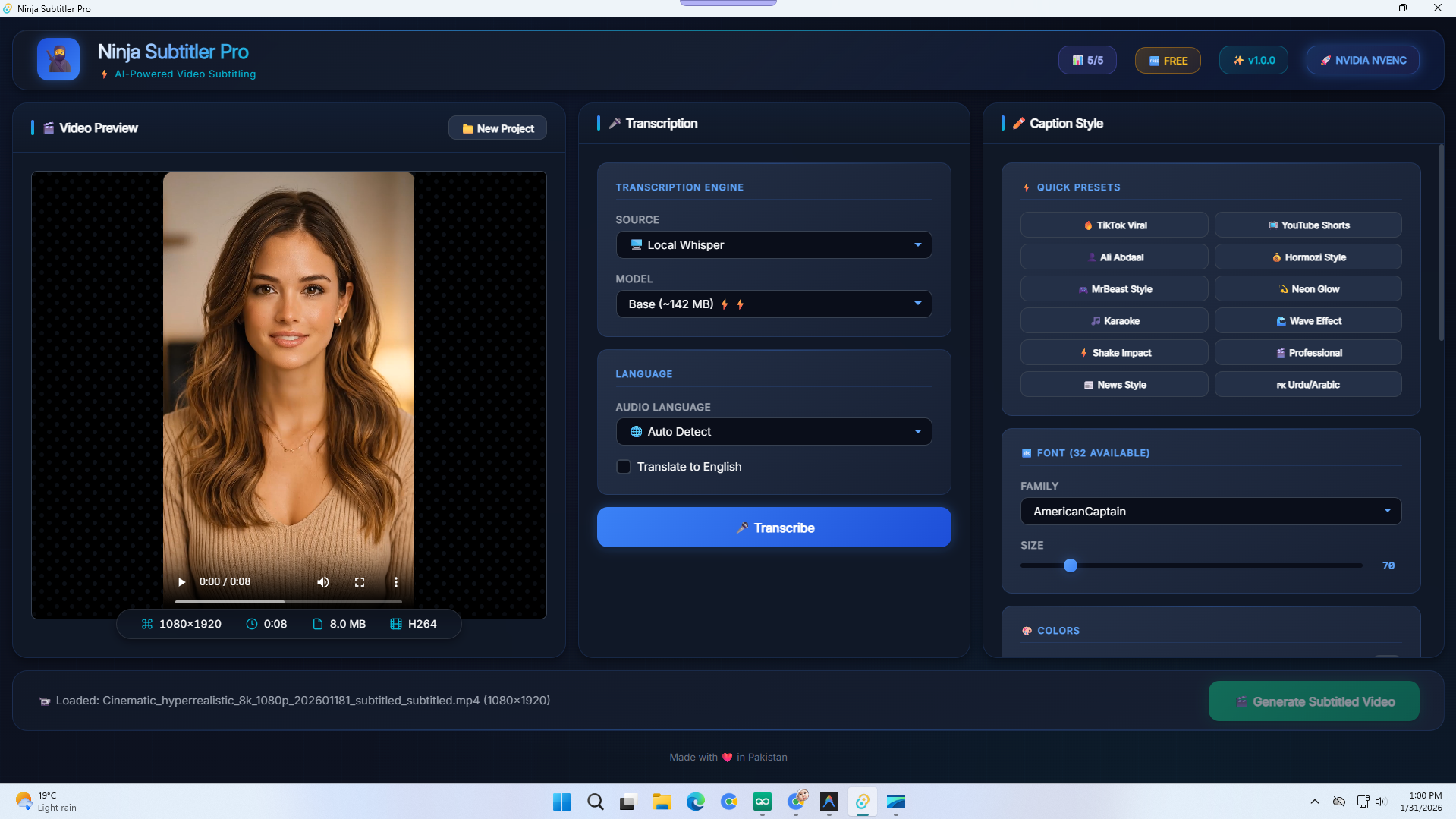
What you see is what you get. Our live preview engine renders your captions directly over your video as you style them. No more "export and hope" — see the exact final result before you commit.
🚀 GPU-Accelerated Export
Why wait 20 minutes for an export when you can finish in 2?
Ninja Subtitler Pro automatically detects your GPU and uses hardware acceleration for blazing-fast video exports:
- NVIDIA NVENC (GTX 900 series and newer)
- AMD VCE/AMF (RX 400 series and newer)
- Intel Quick Sync (6th gen and newer)
- CPU Fallback (works on any system)
Your video quality stays pristine — we preserve the original resolution, bitrate, and frame rate.
🔒 Privacy-First Design
Your videos NEVER leave your computer. Unlike cloud-based tools that upload your content to unknown servers, Ninja Subtitler Pro processes everything locally on your machine.
- No video uploads to third-party servers
- No "analyzing" your content for ads
- No waiting for cloud processing queues
- Works offline (after initial transcription)
Your content stays yours.
Perfect For
✅ YouTube Creators — Add captions to long-form content and Shorts
✅ TikTokers — Create scroll-stopping content that stands out
✅ Instagram Influencers — Boost Reels engagement with pro captions
✅ Course Creators — Make educational content accessible
✅ Podcasters — Turn audio clips into viral video snippets
✅ Agencies — Batch-process client videos with consistent branding
✅ Filmmakers — Add professional subtitles to short films and documentaries
✅ Multilingual Creators — Reach global audiences with translated captions
📦 WHAT'S INCLUDED
What's Included - FREE:
✅ AI Transcription (5 videos/day)
✅ 15+ Word Highlight Animations
✅ 12+ Creator Presets (MrBeast, Hormozi, Ali Abdaal)
✅ 8 Caption Entry Animations
✅ GPU Accelerated Export
✅ Real-Time Video Preview
✅ 50+ Language Support
⏱️ 3 Minute Video Limit
What's Included - PRO:
✅ Everything in FREE, plus:
✅ Unlimited Videos Per Day
✅ Unlimited Video Length
✅ Watermark-Free Exports
✅ Commercial Use License
✅ Priority Email Support
How It Works
Step 1: Load Your Video 📹
Drag and drop any video file (MP4, MOV, AVI, MKV, WebM supported). Ninja Subtitler Pro instantly analyzes your video and displays it in the preview window.
Step 2: AI Transcription 🎤
Click "Transcribe" and watch AI magic happen. In seconds, your entire video is transcribed with word-level timestamps. Wrong word? Click to edit inline.
Step 3: Style Your Captions ✨
Choose from 12+ presets or create your own custom look. Adjust fonts, colors, animations, and positioning. See changes in real-time on the video preview.
Step 4: Export & Share 🚀
Hit Export and let GPU acceleration work its magic. Your video renders in minutes with hardcoded captions baked right in. Upload directly to TikTok, YouTube, or Instagram.
Why Not Just Use [Other Tool]?
✅ One-Time Purchase — No monthly fees ever OR SMALL FEE MONTHLY FOR UNLIMITED USE
✅ Desktop App—Works offline, no internet needed for editing
✅ Privacy First — Videos never leave your computer
✅ 15+ Animations — More than any other tool
✅ GPU Export — 10x faster than cloud tools
✅ RTL Support — Perfect for Arabic, Urdu, Hebrew
❌ Kapwing, Veed — Monthly subscription + cloud upload
❌ Descript — Monthly subscription, limited styling
❌ CapCut — Uploads to China servers, limited presets
Ready to Create Viral Captions?
Stop wasting hours on manual captioning. Join thousands of creators who are using AI to work smarter, not harder.
Download Ninja Subtitler Pro today and transform your content workflow forever.
Made with ❤️ in Pakistan
Media & Screenshots
Key Features
System Requirements
Version History
- 🔄 Fully Redesigned UI/UX
- 🎨 Added New Fonts & Subtitle Styles
- 🌍 Added Multi-Language Subtitle Translation
- 📂 Added Export as .SRT File Support
- ⚡ Improved Processing Speed
- 🛠 Performance Enhancements & Minor Bug Fixes